 TauPDF
Fill in forms and sign PDF files
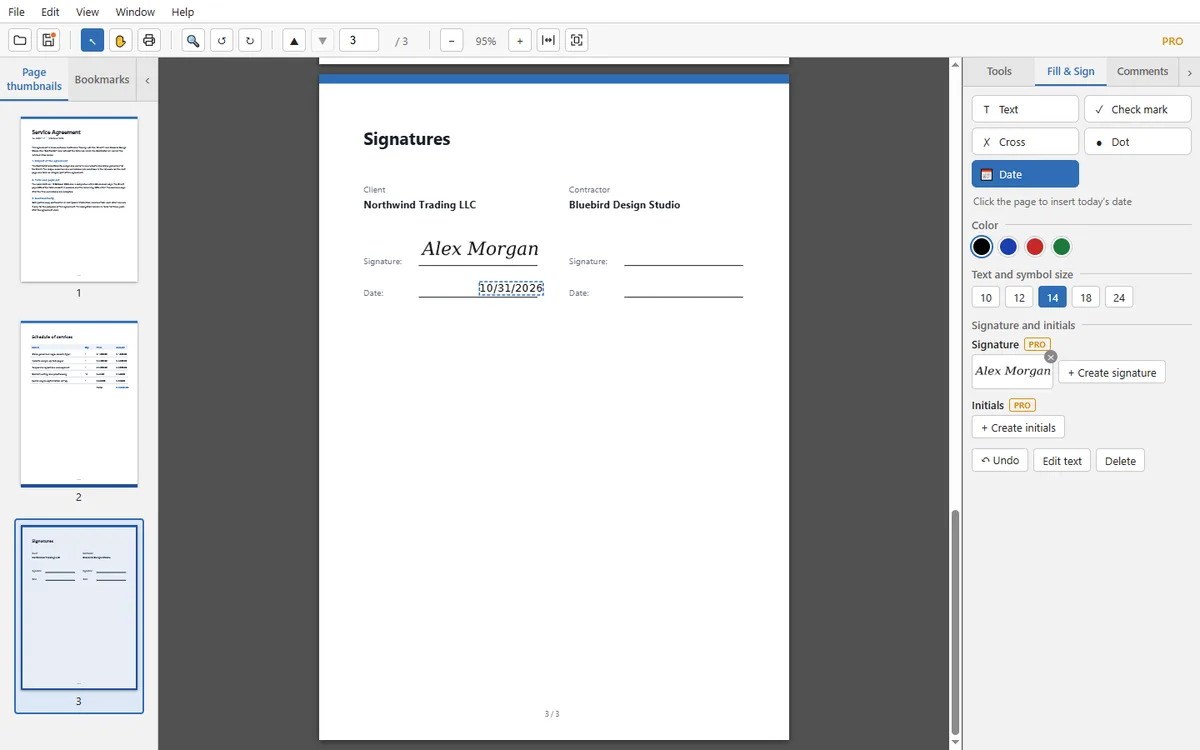
Type into forms, add check marks and dates, and place your signature or initials, drawn, typed or uploaded as an image.
What you can do
- Add text, check marks, crosses, dots and today’s date anywhere on a page, in the size and colour you choose.
- Create a signature by drawing it with the mouse or a finger, typing your name, or uploading an image.
- Create initials the same way and place them page after page.
- Drag the signature from the panel onto the page, or click repeatedly to place it several times.
- Create form fields: text field, check box, radio buttons and drop-down list.
- Clear or flatten a form, and export or import its data.
How to sign a PDF
- Open the document and switch to the Fill & Sign tab.
- Choose Create signature, then Draw, Type or Upload, and press Save and use.
- Click the place on the page where the signature goes. Press Esc when you are done.
- Add the date with the Date tool and save the file.
Questions and answers
Is this a legally binding digital signature?
TauPDF places your signature as an image on the page. It is not a cryptographic digital signature issued by a certificate authority, so check what the other side requires.
Where are my saved signatures stored?
They stay on your computer, in the program’s own settings.
Can I fix the text I placed?
Yes. Select it and use Edit text, or delete it and place it again.
More you can do with TauPDF
Edit text and images in a PDF
Click a line or a paragraph on the page and type. Add your own text, pictures, links and bookmarks. Everything happens on your computer.
Learn more →Organize PDF pages: merge, split, rotate, crop
Combine several files into one, split a long document, extract or delete pages, and add headers, footers or a watermark. No upload needed.
Learn more →Recognize text in scanned PDFs (OCR)
Turn scans and photos of documents into searchable, copyable text. Recognition runs on your computer, so your documents stay private.
Learn more →Protect PDFs: passwords, redaction and clean-up
Lock a document with a password, black out confidential text for good, and remove hidden information before you share a file.
Learn more →Convert PDF to Word, Excel, PowerPoint or images
Save a PDF as an editable Office document, plain text or pictures, or make the file smaller. Conversion runs on your computer.
Learn more →