 TauPDF
Recognize text in scanned PDFs (OCR)
Turn scans and photos of documents into searchable, copyable text. Recognition runs on your computer, so your documents stay private.
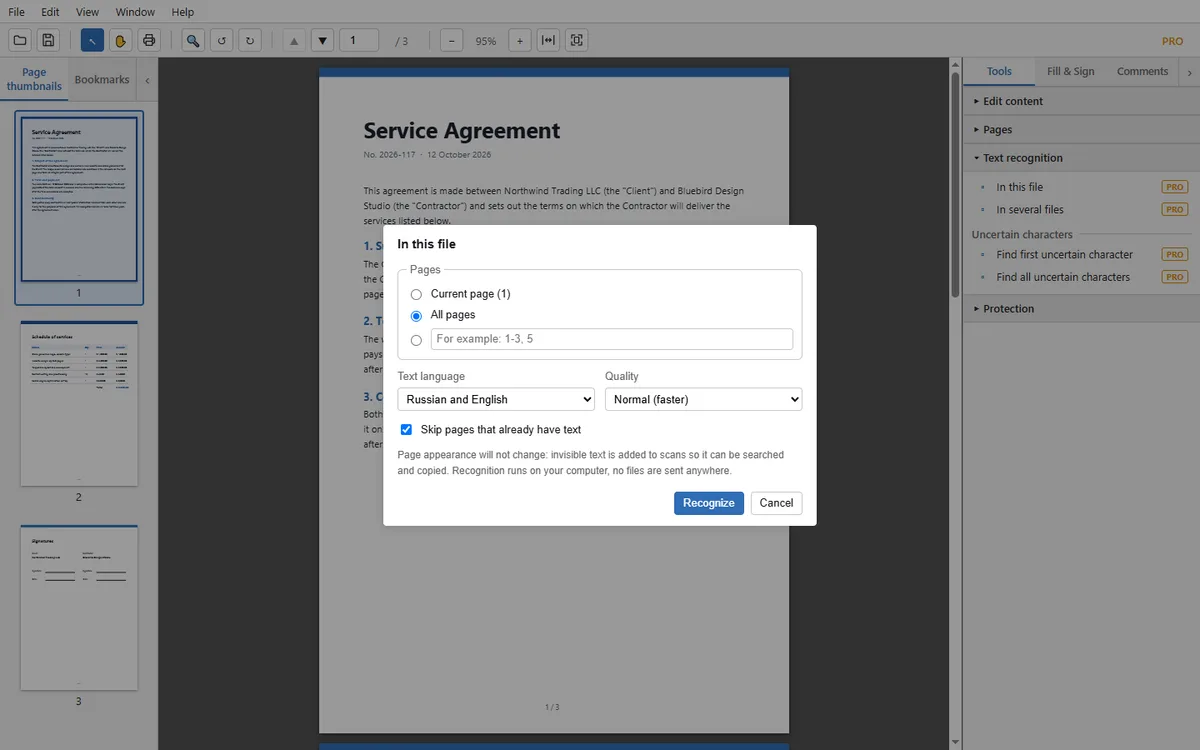
What you can do
- Recognize one file, or many files in one go.
- Choose Russian, English, or both languages together.
- Choose faster or more accurate recognition.
- Skip pages that already have text.
- The page looks exactly the same: invisible text is added behind the scan.
- Find the characters the program is unsure about and check them.
How to recognize a scan
- Open the scanned PDF and choose Tools → Text recognition → In this file.
- Choose the pages, the text language and the quality.
- Press Recognize and wait for the progress to finish.
- Save the file. The text can now be searched and copied.
Questions and answers
Does OCR change how my document looks?
No. Invisible text is added to the scan so it can be searched and copied. The picture of the page is unchanged.
Which languages are supported?
Russian and English, separately or together.
Are my documents sent to a server?
No. Recognition runs on your computer and no files are sent anywhere.
More you can do with TauPDF
Edit text and images in a PDF
Click a line or a paragraph on the page and type. Add your own text, pictures, links and bookmarks. Everything happens on your computer.
Learn more →Organize PDF pages: merge, split, rotate, crop
Combine several files into one, split a long document, extract or delete pages, and add headers, footers or a watermark. No upload needed.
Learn more →Fill in forms and sign PDF files
Type into forms, add check marks and dates, and place your signature or initials, drawn, typed or uploaded as an image.
Learn more →Protect PDFs: passwords, redaction and clean-up
Lock a document with a password, black out confidential text for good, and remove hidden information before you share a file.
Learn more →Convert PDF to Word, Excel, PowerPoint or images
Save a PDF as an editable Office document, plain text or pictures, or make the file smaller. Conversion runs on your computer.
Learn more →